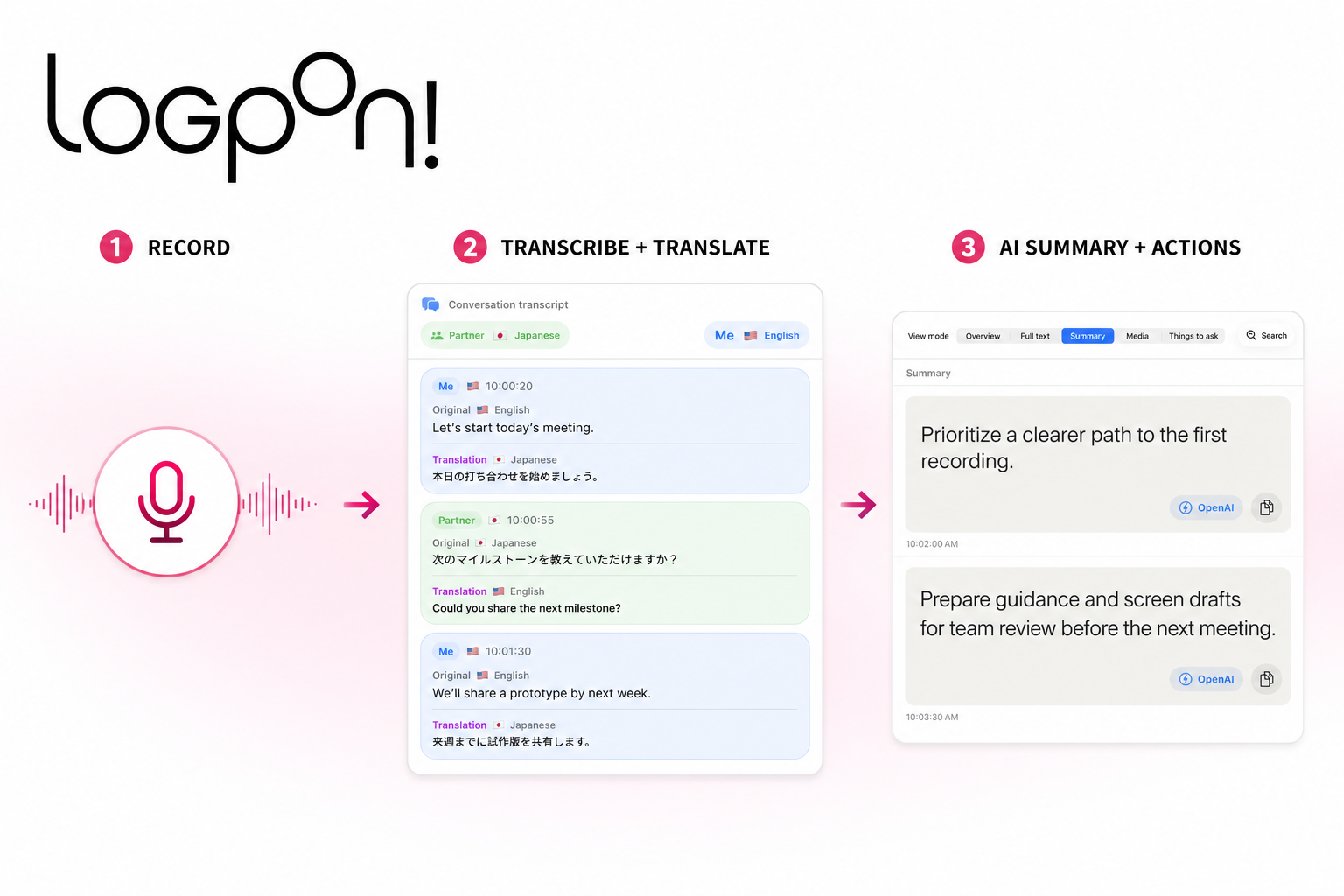
Transcribe Meetings Live.
Turn Them into Notes.

Transcribe meetings, sales calls, and daily discussions live.
Supported OS, languages, and recognition paths can use on-device recognition; Apple Translation or an on-device model can translate locally when required data is installed.
AI summaries can start with ChatGPT account login; an OpenAI API key is optional.

  • Conversation-mode translation
  • AI summaries with ChatGPT
  • On-device recognition when supported

Start for free. Upgrade only when you need to. See pricing

LogPon! live translation on macOS LogPon! meeting notes on macOS
LogPon! recording screen on iPhone LogPon! session draft on iPhone LogPon! session details on iPhone

Innovative Features

Everything you need to document meetings, sales calls, and daily discussions in one app.

Real-Time Transcription

Speech appears on screen in seconds, so you never miss context. During quiet moments, processing is automatically reduced to lower battery and heat impact.

Recording Manager

Capture audio, screen, and video in one app to reduce operational overhead. Transcription keeps running during recording, and the app recovers automatically from interruptions.

ChatGPT Integration and Flexible Processing

Start summaries, ToDo extraction, and overviews with a ChatGPT account. Transcription can use on-device recognition on supported OS, languages, and recognition paths; Apple Translation or an on-device model can translate locally when required data is installed.

Session Draft

Pre-register agenda, URLs, and keywords before start time. Share with your team via QR code, then organize with folders and tags.

Media Management

Extract and edit text from document photos on the spot. Zoom and still-frame capture in video HUD help you keep slides and materials intact.

Conversation-Mode Translation

Translate multilingual dialogue, such as Japanese and English, in real time. Keep the original, translation, and speaker flow together so the archive is easy to review.

Start without generative AI. Expand when ready.

Start recording and transcribing without connecting generative AI. Supported recognition paths can run on device, and Apple Translation or on-device models can run locally when required data is installed.

Without generative AI

Record, transcribe, and translate with the processing your environment supports

  • Real-time conversation transcription
  • Local translation with Apple Translation or on-device models after required data is installed
  • Continue recording in unstable network environments

With ChatGPT login or API keys

Turn records into summaries, decisions, and proposals

  • Conversation summaries and 30-second summaries
  • Key points, ToDos, and decisions
  • Draft next actions and follow-up suggestions

Same Workflow on
macOS and iOS

Optimized for both iOS and macOS. Keep recording and transcribing through long sessions with low heat and stable performance, regardless of device.

LogPon! for macOS

How It Works

From recording to sharing in 5 simple steps.

1

Create a Session

Register agenda and URLs in DraftEditor. Session context is prepared quickly before meetings begin.

2

Catch the Reminder

Never miss the start time. Launch recording and capture with a single tap.

3

Transcribe Live

Conversations are transcribed in real time. Supported recognition paths can run on device; Apple Translation or on-device models can translate locally when their data is installed.

4

Capture Photos & Video

Record photos and videos on the spot. OCR converts slide/document text into reusable data.

5

Share in One Click

After the session, share results with one click. Choose destination and visibility to match your workflow.

Where It Shines

🌐

Global Conferences

Keep recording when a venue network is unstable. Transcription stays local only on supported on-device recognition paths; Apple Translation or on-device models stay local when required data is installed and online fallback is not used.

👥

Team Collaboration

Prepare with Draft, then share summaries with your team after recording. Significantly reduce manual meeting-note workload.

💻

Hybrid Meetings

Use macOS for system audio + mic, and iOS for video + transcription. Mix devices flexibly to match each meeting format.

Guides by Use Case

Start with the workflow closest to your next meeting.

Why Teams Trust LogPon!

Stable for Long Sessions

Designed for low heat and stable operation, so recording and transcription continue through the full session.

Automatic Recovery

If recording stops unexpectedly, LogPon! recovers automatically and reduces manual retry stress.

Cross-Device Sync

Sync photos and notes across devices so sessions can be reviewed from anywhere.

Processing that fits your environment

Use on-device transcription on supported recognition paths and local translation through Apple Translation or on-device models when required data is installed. Network requirements vary with fallback settings.

Frequently Asked Questions

Do summaries and ToDo extraction require an OpenAI API key?

No. Connect an OpenAI (ChatGPT) account to start summaries, ToDo extraction, and overviews within your ChatGPT plan. OpenAI and Claude API keys remain optional alternatives.

Can translation work offline?

Translation works offline only when Apple Translation or an on-device model is selected, required data is installed, and online fallback is not used. DeepL, OpenAI, and other online methods require a network. Transcription connectivity depends on the OS, language, and active recognition path.

Can I connect LogPon! to Claude Code or Codex?

Yes. On macOS, copy the read-only MCP registration command from LLM Manager so Claude Code or OpenAI Codex can reference LogPon's local database.

Can iOS record video and transcribe at the same time?

Yes. Transcription continues while video recording is active, so both can be captured simultaneously.

Can I share drafts across devices?

Yes. You can transfer drafts via QR code and keep local and remote members in sync.

Can I use LogPon! without an internet connection?

Recording and note management can work without a network. Transcription is offline only on a supported on-device recognition path with required data installed. Translation is offline only with Apple Translation or an on-device model, installed data, and no online fallback. Other configurations require a network.

What should I check before recording a meeting?

Tell participants why you are recording and how data will be handled, obtain any required consent, and follow your organization's rules, agreements, and local law.

LogPon!

Get Started with LogPon!

Start for free. Upgrade only when you need to.